Navigation pane
The navigation pane lists the workbenches available to you and the navigation nodes that make up the selected workbench. Each node opens a view that provides access to a category of FDM database records, settings, properties, events, objects, or components.
If your FDM user account is assigned to a single business unit, the nodes in the navigation pane provide you access only to the records, settings, properties, and other information for that business unit. If your FDM user account is assigned to two or more business units, a drop-down business unit selector appears at the top of the navigation pane. In this case, the nodes you see in the navigation pane and the information they give you access to pertain only to the business unit displayed in the business unit selector.
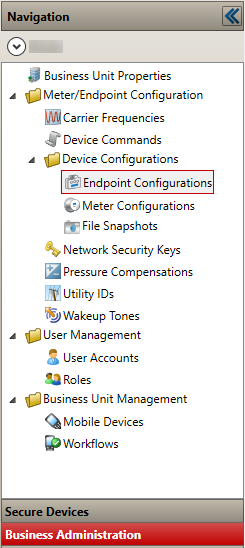
|
Workbench/Navigation nodes |
|
|---|---|
|
Secure Devices |
|
|
Secure Devices |
A diagnostics tool that is intended for advanced FDM users. The workbench allows you to monitor the status of a device and to monitor what communications with the device have occurred. The workbench displays a list of all secure devices to which a user has access and the current security state of those devices. A business unit user’s list displays all devices available for their specific business unit while a system administrator will see all available devices regardless of business unit. |
|
Business Administration |
|
|
Business Unit Properties |
Displays general settings used throughout your business unit. These include its name, the market types of its utility meters (electric, gas, water, or telemetry), and the direction in which the FDM mobile software displays and records meter readings entered by your field service personnel. Your business unit's properties are configured by Itron. You cannot modify them directly. |
|
Meter/Endpoint Configuration |
|
|
Carrier Frequencies |
Lets you add and configure radio carrier frequencies licensed to your business unit for its handheld radios by the Federal Communications Commission (FCC) or Industry Canada. |
|
Device Commands |
Lets you view mobile device command logs, export command logs to XML-formatted files, export command logs to CRF-formatted files, and lets you view and print datalogging information retrieved during Extract Interval Data commands. |
|
Device Configurations |
|
|
Endpoint Configurations |
Lets you view, reorder, enable or disable, and modify the properties of endpoint types supported by your business unit’s workflows. |
|
Meter Configurations |
Lets you view, reorder, enable or disable, and modify the properties of meters supported by your business unit’s workflows. |
|
File Snapshots |
Lets you create password-encrypted XML files containing endpoint, meter, and associated settings for use by meter manufacturers in programming endpoints at the factory. |
|
Network Security Keys |
Lets you view, reorder, enable or disable, and modify the properties of network security keys used by your business unit’s workflows. This node appears only if you enable one or more endpoints in the Endpoint Configurations node that use network security keys. |
|
Pressure Compensations |
Lets you view, reorder, enable or disable, and modify the properties of pressure compensation factors (PCOMPs) supported by your business unit’s workflows. This node appears only if you enable one or more gas endpoints in the Endpoint Configurations view that require pressure compensation values. |
|
Utility IDs |
Lets you view, reorder, enable or disable, and modify the properties of utility IDs used by your business unit’s workflows. This node appears only if you enable one or more endpoints in the Endpoint Configurations view that require utility IDs. Utility IDs are assigned by Itron. |
|
Wakeup Tones |
Lets you view, reorder, enable or disable, and modify the properties of endpoint wakeup tones supported by your business unit’s workflows. This node appears only if you enable one or more endpoints in the Endpoint Configurations view that use wakeup tones. Wakeup Tones are assigned by the FCC. |
|
User Management |
|
|
User Accounts |
Lets you set up FDM user accounts and associate each one with the appropriate role for that user. |
|
Roles |
Lets you create new FDM user roles and manage existing ones, assigning to each role the permissions you want it to have to access specific FDM functions. |
|
Business Unit Management |
|
|
Blackout Periods |
Lets you prevent work order dispatching based on a cycle during a certain time period. Blackout Periods only display under the Business Unit Management node if the Work Orders Product Module is loaded. |
|
Export Schedules |
Lets you view, enable or disable, and modify the properties and export criteria of scheduled work order exports. The Export Schedules only appears as available if there is an export package loaded in the Import/Export Packages node of the System Administration workbench. The Export Schedules functions to export work orders based upon the parameters set in the Export Criteria tab. |
|
Mobile Devices |
Lets you update the FDM mobile application on your handheld and laptop meter data collection devices. You can install a new version of the application on all of your mobile devices or only on selected ones. |
|
Workflows |
Lets you update workflows on your handheld and laptop meter data collection devices. |